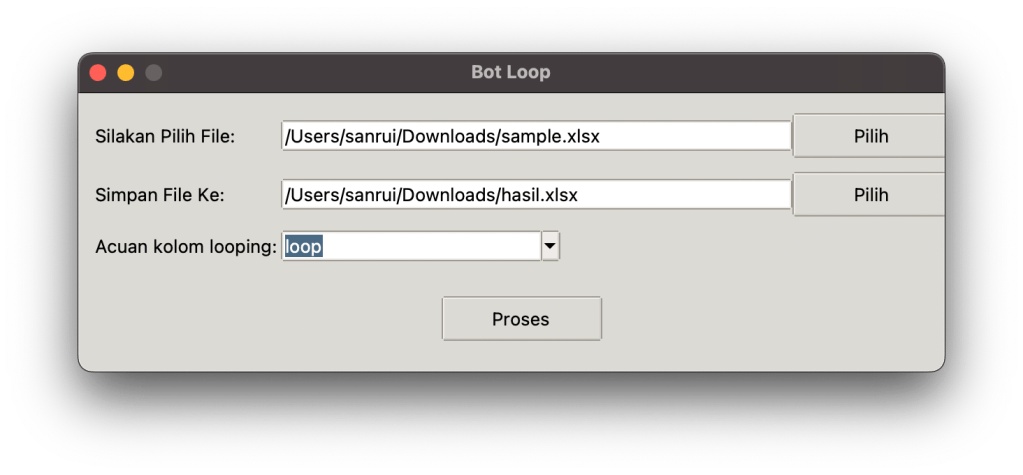
Sebuah aplikasi sederhana berbasis Python dan Tkinter untuk mengulang baris dalam file Excel berdasarkan nilai dalam kolom tertentu.
📌 Fitur
✅ Membaca file Excel (.xlsx, .xls)
✅ Memilih kolom sebagai acuan looping
✅ Menghasilkan file Excel baru dengan baris yang diulang sesuai nilai di kolom tersebut
✅ Antarmuka GUI sederhana berbasis Tkinter
📦 Instalasi
Pastikan sudah menginstal Python dan beberapa library berikut:
pip install pandas openpyxl
🚀 Cara Menggunakan
1️⃣ Jalankan script dengan perintah berikut:
python nama_script.py
2️⃣ Pilih file Excel yang ingin diproses
3️⃣ Pilih kolom yang berisi jumlah looping
4️⃣ Pilih lokasi untuk menyimpan hasil proses
5️⃣ Klik tombol “Proses” dan tunggu hingga selesai

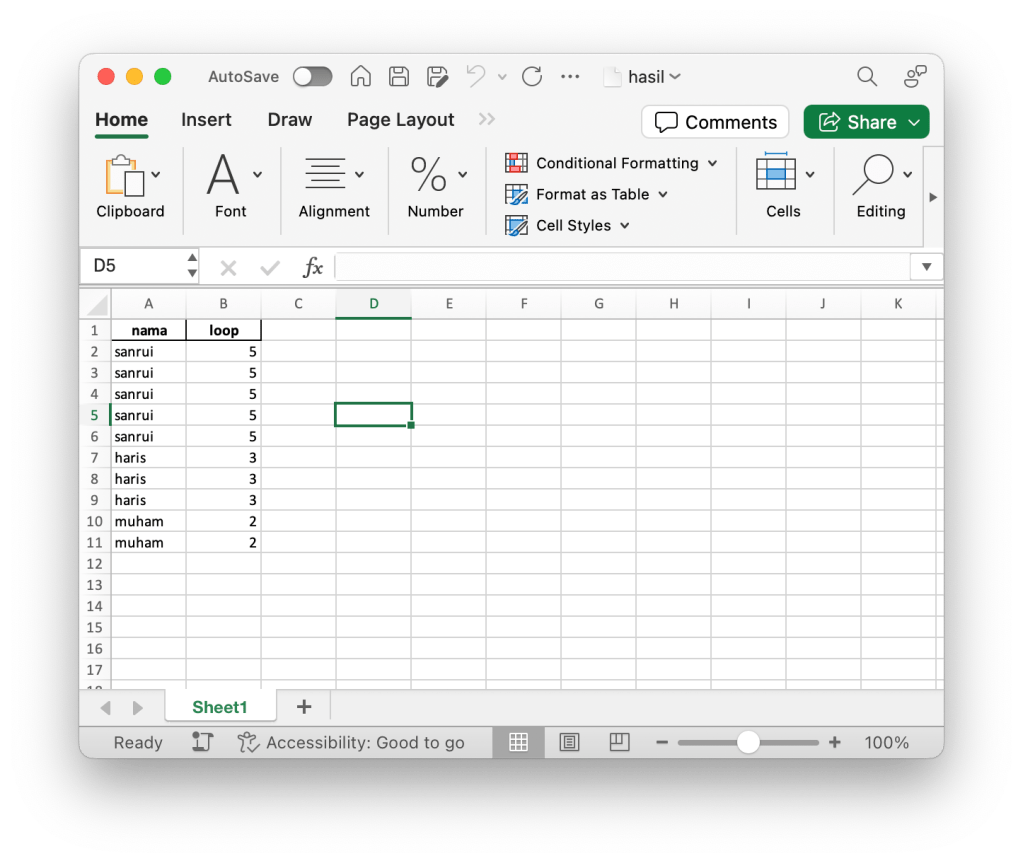
🔧 Kode Utama
import pandas as pd
import tkinter as tk
from tkinter import filedialog, messagebox, ttk

def process_excel(file_path, output_path, loop_column):
    df = pd.read_excel(file_path)
    rows = []
    for _, row in df.iterrows():
        loop_count = int(row[loop_column])
        for _ in range(loop_count):
            rows.append(row)

    new_df = pd.DataFrame(rows, columns=df.columns)
    new_df.to_excel(output_path, index=False)
    messagebox.showinfo("Selesai", "File Selesai di looping dan disimpen")

def select_file():
    file_path = filedialog.askopenfilename(
        title="Pilih File Excel",
        filetypes=[("Excel files", "*.xlsx *.xls")]
    )
    file_entry.delete(0, tk.END)
    file_entry.insert(0, file_path)

    if file_path:
        df = pd.read_excel(file_path)
        columns = df.columns.tolist()
        column_combobox['values'] = columns
        column_combobox.set('')

def save_file():
    output_path = filedialog.asksaveasfilename(
        defaultextension=".xlsx",
        filetypes=[("Excel files", "*.xlsx *.xls")],
        title="Simpan File Sebagai"
    )
    output_entry.delete(0, tk.END)
    output_entry.insert(0, output_path)

def start_processing():
    file_path = file_entry.get()
    output_path = output_entry.get()
    loop_column = column_combobox.get()

    if not file_path or not output_path or not loop_column:
        messagebox.showerror("Maaf", "Pilih file atau kolom terlebih dulu")
        return

    try:
        process_excel(file_path, output_path, loop_column)
    except Exception as e:
        messagebox.showerror("Maaf", f"Error: {e}")

root = tk.Tk()
root.title("Bot Loop")
root.geometry("620x200")
root.resizable(False, False)

frame = ttk.Frame(root, padding="10")
frame.grid(row=0, column=0, sticky=(tk.W, tk.E, tk.N, tk.S))

file_label = ttk.Label(frame, text="Silakan Pilih File:")
file_label.grid(row=0, column=0, pady=5, sticky=tk.W)
file_entry = ttk.Entry(frame, width=40)
file_entry.grid(row=0, column=1, pady=5, sticky=tk.W)
file_button = ttk.Button(frame, text="Pilih", command=select_file)
file_button.grid(row=0, column=2, pady=5, sticky=tk.W)

output_label = ttk.Label(frame, text="Simpan File Ke:")
output_label.grid(row=1, column=0, pady=5, sticky=tk.W)
output_entry = ttk.Entry(frame, width=40)
output_entry.grid(row=1, column=1, pady=5, sticky=tk.W)
output_button = ttk.Button(frame, text="Pilih", command=save_file)
output_button.grid(row=1, column=2, pady=5, sticky=tk.W)

column_label = ttk.Label(frame, text="Acuan kolom looping:")
column_label.grid(row=2, column=0, pady=5, sticky=tk.W)
column_combobox = ttk.Combobox(frame, width=20)
column_combobox.grid(row=2, column=1, pady=5, sticky=tk.W)

process_button = ttk.Button(frame, text="Proses", command=start_processing)
process_button.grid(row=3, column=0, columnspan=3, pady=20)

root.mainloop()
📜 Lisensi
Proyek ini menggunakan lisensi MIT, sehingga bebas digunakan dan dikembangkan.
README ini cocok untuk GitHub atau dokumentasi di blog Mas San. 🚀
 sanrui.id